Career Switch to Frontend - Pre-Job-Hunt Checklist
This post shares what I prepared before applying for frontend roles: resume formats, platforms, GitHub profile setup, project write-ups, and a portfolio site.
Resume Versions You Should Prepare
At first I thought one resume was enough. Later I realized each platform has its own structure and limitations, so preparing multiple versions saves a lot of friction.
A4 General Version
I used this article as a guide:
How to write an effective developer resume: Advice from a hiring manager
The key takeaway: highlight what is relevant to the role. Since I did not have direct frontend work experience, I put my projects near the top and old unrelated work later.
You can host your resume on Netlify and share a direct link.
I also used this template.
CakeResume
Good for showcasing projects and creating visual resumes. You can reorder sections, so put the most relevant content first and move unrelated experience lower.
Tip: avoid white backgrounds for project screenshots, or the borders may disappear on printed resumes.
Yourator
You can reorder sections, but for applications you cannot upload a fully custom resume file. If I want a custom version, I try to find the same opening on other platforms.
104
104 now supports section reordering and project images. But the generated resume may force your previous job title at the top, which can be less friendly for career switchers.
They also provide free resume reviews by industry experts.
Other Platforms to Apply or Increase Visibility
Create a full profile and build your network. You can also read my post about building a LinkedIn profile from scratch.
Meet.jobs
No native resume page; you fill in fields and upload files. You can upload custom PDFs and add your portfolio link.
They sometimes host online interview days with multiple companies.
A unique point: if you get hired through the platform, there can be a USD 100 referral bonus.
Teamdoor
You do not need to register as a candidate. For open roles, you can apply directly and either fill in data manually or import from Yourator.
AppWorks
Applications are handled through Yourator, but AppWorks has many startup introductions worth reading:
GitHub
Profile Setup
Bio next to avatar
Keep it simple: role keywords, email, and location.
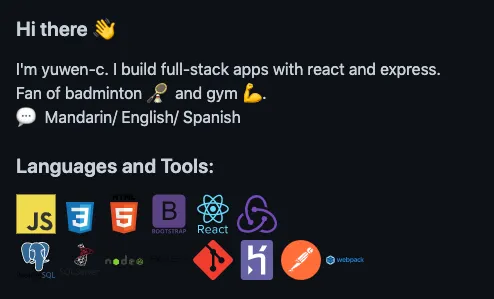
Personal README.md
See the official docs.
I also recommend github readme generator:
Pin repos
Pin up to 6 repos and edit each repo description so visitors can quickly understand what each project does.
Write Detailed Project Introductions
Document each project clearly in README.md. Hiring managers review many resumes and repositories, so make understanding your work easy.
My process:
- Revisit major project functions
- Reconstruct overall flow
- Split sections by features, tech choices, implementation, frontend/backend connection, and state changes
Explaining why you chose a tool is especially valuable.
I also add flowcharts with Draw.io, and I made both Chinese and English versions for my target market.
Mandarin project write-up example
This takes effort, but it also becomes interview preparation.
Portfolio Site as an Entry Point
A single website that combines your resume and projects is very effective.
I used a project template from a Zero To Mastery student: simplefolio.